Common JSONPath Expressions Every Developer Should Know
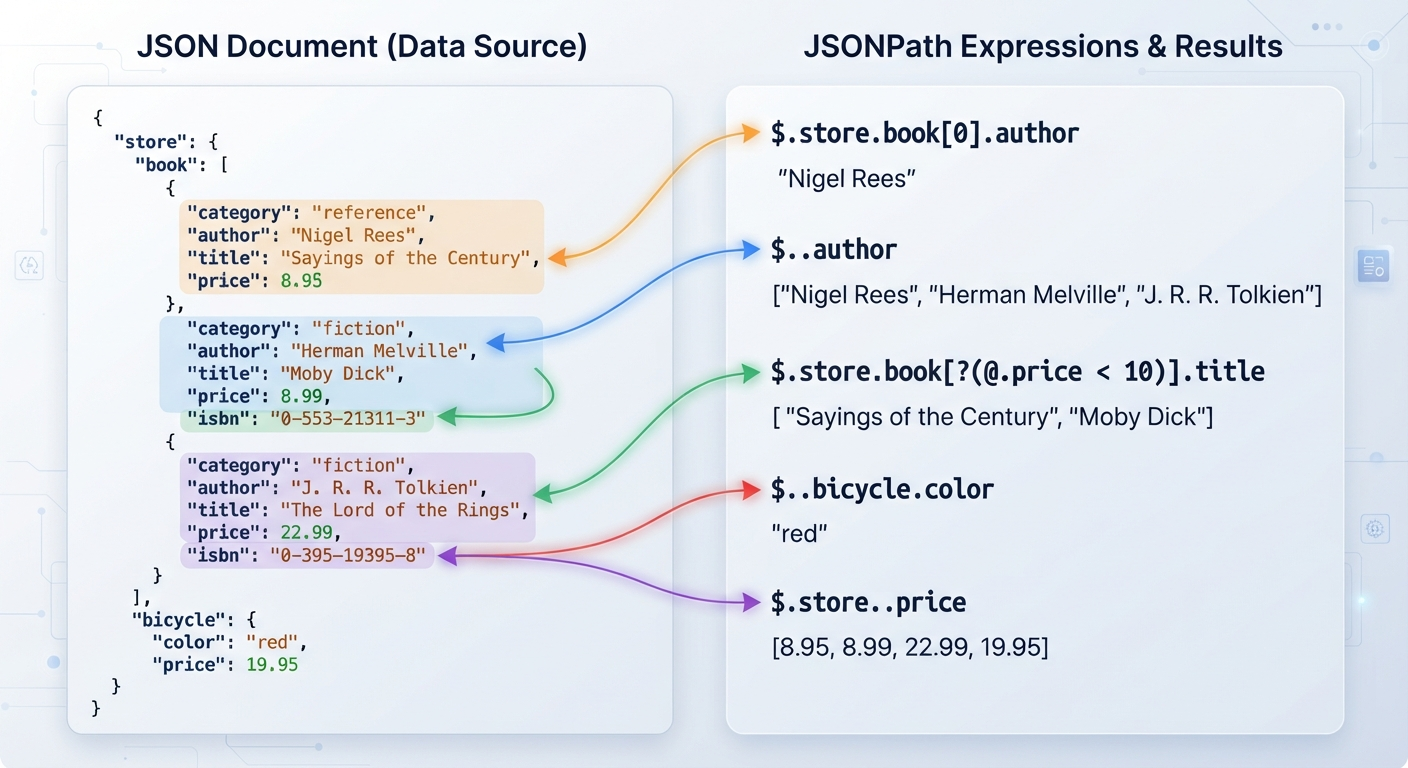
JSON has become the standard format for exchanging data between applications, APIs, and web services. Whether you're building a web application, testing APIs, automating workflows, or analyzing data, you'll often need to locate specific values inside a JSON document.
That's where JSONPath comes in.
JSONPath is a query language that lets you navigate through JSON data using simple expressions. Instead of manually searching through nested objects and arrays, you can write concise queries to retrieve exactly the information you need.
In this guide, you'll learn the most common JSONPath expressions every developer should know, understand when to use each one, explore practical examples, and see how JSON Path Finder on CodeNimbleTools can make experimenting with JSONPath much easier.
What Is JSONPath?
JSONPath is a syntax used to navigate and select elements from a JSON document. If you've worked with XML before, you can think of JSONPath as serving a similar purpose to XPath, but specifically for JSON.
Rather than reading through an entire JSON file manually, JSONPath allows you to specify exactly which values you want.
For example, consider this JSON:
{
  "store": {
    "name": "Tech Store",
    "products": [
      {
        "id": 101,
        "name": "Laptop",
        "price": 1200
      },
      {
        "id": 102,
        "name": "Mouse",
        "price": 25
      }
    ]
  }
}
Instead of searching through the object yourself, a JSONPath expression can directly retrieve the product names or prices.
Why Learn Common JSONPath Expressions?
Knowing a handful of JSONPath expressions can save significant time when working with structured data.
They are commonly used for:
- API testing
- Automation scripts
- Data extraction
- Configuration files
- Log analysis
- Web development
- JSON validation
- No-code and low-code automation platforms
Once you understand the core expressions, most JSON documents become much easier to navigate.
Essential JSONPath Expressions
1. Root Object ($)
Every JSONPath expression starts from the root object.
Expression:
$
Example JSON:
{
  "user": {
    "name": "Alice"
  }
}
Result:
{
  "user": {
    "name": "Alice"
  }
}
Think of $ as saying:
"Start from the top of the JSON document."
2. Child Operator (.)
The dot operator selects a child property.
Expression:
$.user.name
JSON:
{
  "user": {
    "name": "Alice",
    "age": 28
  }
}
Output:
Alice
This is probably the JSONPath expression you'll use most often.
3. Bracket Notation (['property'])
Bracket notation is another way to access properties.
Example:
$['user']['name']
Result:
Alice
Bracket notation is useful when property names contain:
- Spaces
- Hyphens
- Special characters
- Reserved words
For example:
{
  "employee name": "John"
}
Expression:
$['employee name']
4. Wildcard (*)
The wildcard selects every matching property or array element.
Example:
$.store.products[*]
JSON:
{
  "store": {
    "products": [
      {
        "name": "Laptop"
      },
      {
        "name": "Keyboard"
      },
      {
        "name": "Monitor"
      }
    ]
  }
}
Result:
[
  {
    "name": "Laptop"
  },
  {
    "name": "Keyboard"
  },
  {
    "name": "Monitor"
  }
]
If you only need the names:
$.store.products[*].name
Output:
Laptop
Keyboard
Monitor
Wildcards are particularly useful when the number of items isn't fixed.
5. Array Index
Arrays use zero-based indexing.
Expression:
$.store.products[0]
Result:
{
  "name": "Laptop"
}
Second item:
$.store.products[1]
Third item:
$.store.products[2]
This works exactly like indexing arrays in many programming languages.
6. Multiple Array Indexes
You can retrieve multiple elements simultaneously.
Expression:
$.store.products[0,2]
Output:
[
  {
    "name": "Laptop"
  },
  {
    "name": "Monitor"
  }
]
This avoids running multiple queries when you only need specific elements.
7. Array Slice
Slices work similarly to Python list slicing.
Expression:
$.store.products[1:3]
Given:
[
  "Laptop",
  "Mouse",
  "Keyboard",
  "Monitor"
]
Output:
[
  "Mouse",
  "Keyboard"
]
The first number is inclusive.
The second number is exclusive.
8. Recursive Descent (..)
Recursive descent searches for matching properties anywhere below the current node.
Example:
$..price
JSON:
{
  "store": {
    "products": [
      {
        "price": 25
      },
      {
        "price": 60
      }
    ],
    "services": {
      "repair": {
        "price": 80
      }
    }
  }
}
Output:
[
  25,
  60,
  80
]
This is extremely useful when the exact nesting level is unknown.
9. Filter Expressions (?())
Filter expressions let you select array elements that match a condition. They are among the most powerful JSONPath features, although support varies slightly between JSONPath implementations.
Consider the following JSON:
{
  "products": [
    {
      "id": 101,
      "name": "Laptop",
      "price": 1200,
      "inStock": true
    },
    {
      "id": 102,
      "name": "Mouse",
      "price": 25,
      "inStock": false
    },
    {
      "id": 103,
      "name": "Keyboard",
      "price": 80,
      "inStock": true
    }
  ]
}
Find products that are in stock:
$.products[?(@.inStock == true)]
Result:
[
  {
    "id": 101,
    "name": "Laptop",
    "price": 1200,
    "inStock": true
  },
  {
    "id": 103,
    "name": "Keyboard",
    "price": 80,
    "inStock": true
  }
]
The @ symbol refers to the current item being evaluated.
10. Comparison Operators
Filters become even more useful with comparison operators.
Equal
$.products[?(@.price == 80)]
Greater Than
$.products[?(@.price > 100)]
Less Than
$.products[?(@.price < 50)]
Greater Than or Equal
$.products[?(@.price >= 100)]
Less Than or Equal
$.products[?(@.price <= 100)]
Not Equal
$.products[?(@.price != 25)]
These expressions are commonly used in API testing and automation scripts where only specific records are needed.
11. Selecting a Property After Filtering
You can combine filtering with property selection.
Example:
$.products[?(@.price > 100)].name
Output:
Laptop
This avoids retrieving unnecessary data when you only need one field from matching objects.
12. Combining Multiple Conditions
Many JSONPath implementations allow logical operators such as && and ||.
Example:
$.products[?(@.price > 50 && @.inStock == true)]
This selects products that:
- cost more than 50
- are currently in stock
Always check the documentation for the JSONPath implementation you're using, as support for logical operators can differ.
Real-World Examples of JSONPath
Learning expressions is useful, but understanding where they apply makes them much easier to remember.
API Testing
Suppose an API returns customer data.
{
  "customers": [
    {
      "id": 1,
      "email": "alice@example.com"
    },
    {
      "id": 2,
      "email": "bob@example.com"
    }
  ]
}
Retrieve every email:
$.customers[*].email
This is a common assertion in API testing tools.
E-commerce Applications
Suppose an online store returns product information.
Retrieve all product prices:
$..price
Retrieve products over $500:
$.products[?(@.price > 500)]
Configuration Files
Many applications use JSON configuration files.
Example:
{
  "database": {
    "host": "localhost",
    "port": 5432
  }
}
Retrieve the database host:
$.database.host
Automation Workflows
Automation platforms often receive JSON from APIs.
Instead of processing the entire response, JSONPath can extract only the required value.
For example:
$.order.customer.email
The extracted email can then be passed to another workflow step.
When Should You Use JSON Path Finder?
Writing JSONPath expressions is easy for simple data, but larger JSON files quickly become difficult to navigate.
A tool like JSON Path Finder on CodeNimbleTools can help you:
- Experiment with different JSONPath expressions.
- Verify whether a query returns the expected data.
- Learn JSONPath syntax by testing examples.
- Work with deeply nested JSON documents more efficiently.
- Troubleshoot expressions while developing or testing applications.
Rather than manually searching through large JSON responses, you can validate your expressions against sample data before using them in your projects.
Benefits of Using JSONPath
JSONPath offers several practical advantages.
Easy Data Extraction
Retrieve only the values you need instead of processing an entire JSON document.
Cleaner Code
Applications often become simpler because the query handles the navigation.
Better API Testing
Many API testing tools support JSONPath for assertions and validations.
Faster Debugging
Well-written JSONPath expressions help locate incorrect or missing data quickly.
Reusable Queries
The same expressions can often be reused across different environments and projects with similar JSON structures.
Limitations of JSONPath
Although JSONPath is extremely useful, it's important to understand its limitations.
Implementation Differences
Not every library supports every JSONPath feature. Filters and advanced expressions can behave differently depending on the implementation.
Readability
Complex nested filters may become difficult to understand if overused.
Not a Data Transformation Language
JSONPath is intended for selecting data, not restructuring or modifying it.
Keeping these limitations in mind will help you choose the right tool for each task.
Common Mistakes to Avoid
Forgetting the Root Symbol
Incorrect:
products[*].name
Correct:
$.products[*].name
Mixing Dot and Bracket Notation Incorrectly
If a property contains spaces or special characters, use bracket notation.
Correct:
$['employee name']
Incorrect:
$.employee name
Assuming Every JSONPath Library Works the Same
Always verify whether your chosen library supports:
- filter expressions
- recursive descent
- logical operators
- slicing
Using Recursive Descent Everywhere
Although convenient,
$..price
searches every level of the document.
If you already know the location, a direct path is usually clearer and easier to maintain.
Best Practices
- Keep expressions as specific as possible.
- Prefer direct paths over recursive searches when you know the structure.
- Test queries using sample JSON before adding them to production code.
- Keep JSON documents well formatted for easier debugging.
- Understand the JSON structure before writing complex expressions.
- Use filters only when necessary to keep queries readable.
How to Use JSON Path Finder
Whether you're learning JSONPath or verifying expressions for a project, a JSONPath testing tool can save time and reduce errors. Since tool interfaces can vary, follow this general process when using JSON Path Finder on CodeNimbleTools:
-
Prepare your JSON data
Copy the JSON document or API response you want to work with. Ensure it is valid JSON before testing any expressions. -
Enter your JSONPath expression
Start with a simple query such as$.users[*].nameand refine it as needed. -
Review the returned results
Check whether the output matches the values you expected. If not, inspect your JSON structure and adjust the expression. -
Experiment with different expressions
Try wildcards, array indexes, slices, and filters to better understand how JSONPath navigates your data. -
Use the validated expression in your project
Once you're confident the query returns the correct results, you can use it in your application, API tests, automation workflow, or data-processing script.
Testing expressions before adding them to production code helps reduce mistakes and makes debugging much easier.
Real-World Use Case: Extracting Order Information from an API
Imagine you're building an e-commerce dashboard that retrieves order details from an API.
The API returns the following JSON:
{
  "orders": [
    {
      "id": 1001,
      "customer": {
        "name": "Alice"
      },
      "status": "Shipped"
    },
    {
      "id": 1002,
      "customer": {
        "name": "Bob"
      },
      "status": "Pending"
    },
    {
      "id": 1003,
      "customer": {
        "name": "Charlie"
      },
      "status": "Shipped"
    }
  ]
}
To retrieve the names of customers whose orders have been shipped, you could use:
$.orders[?(@.status == "Shipped")].customer.name
Expected output:
Alice
Charlie
Instead of looping through the entire JSON object in your code, a single JSONPath expression extracts the required information. This approach is particularly useful in API testing, automation, reporting, and integrations where only specific values are needed.
Conclusion
Learning the common JSONPath expressions can significantly improve the way you work with JSON data. From selecting individual properties to filtering arrays and navigating deeply nested objects, these expressions simplify data extraction for developers, students, testers, freelancers, and website owners alike.
The more familiar you become with JSONPath, the easier it is to work with APIs, configuration files, automation workflows, and structured datasets.
If you'd like to practice your queries or verify expressions against your own JSON data, try JSON Path Finder on CodeNimbleTools. It's a practical way to experiment with JSONPath, confirm your results, and build confidence before using expressions in real projects.